Small Business Accounting Software
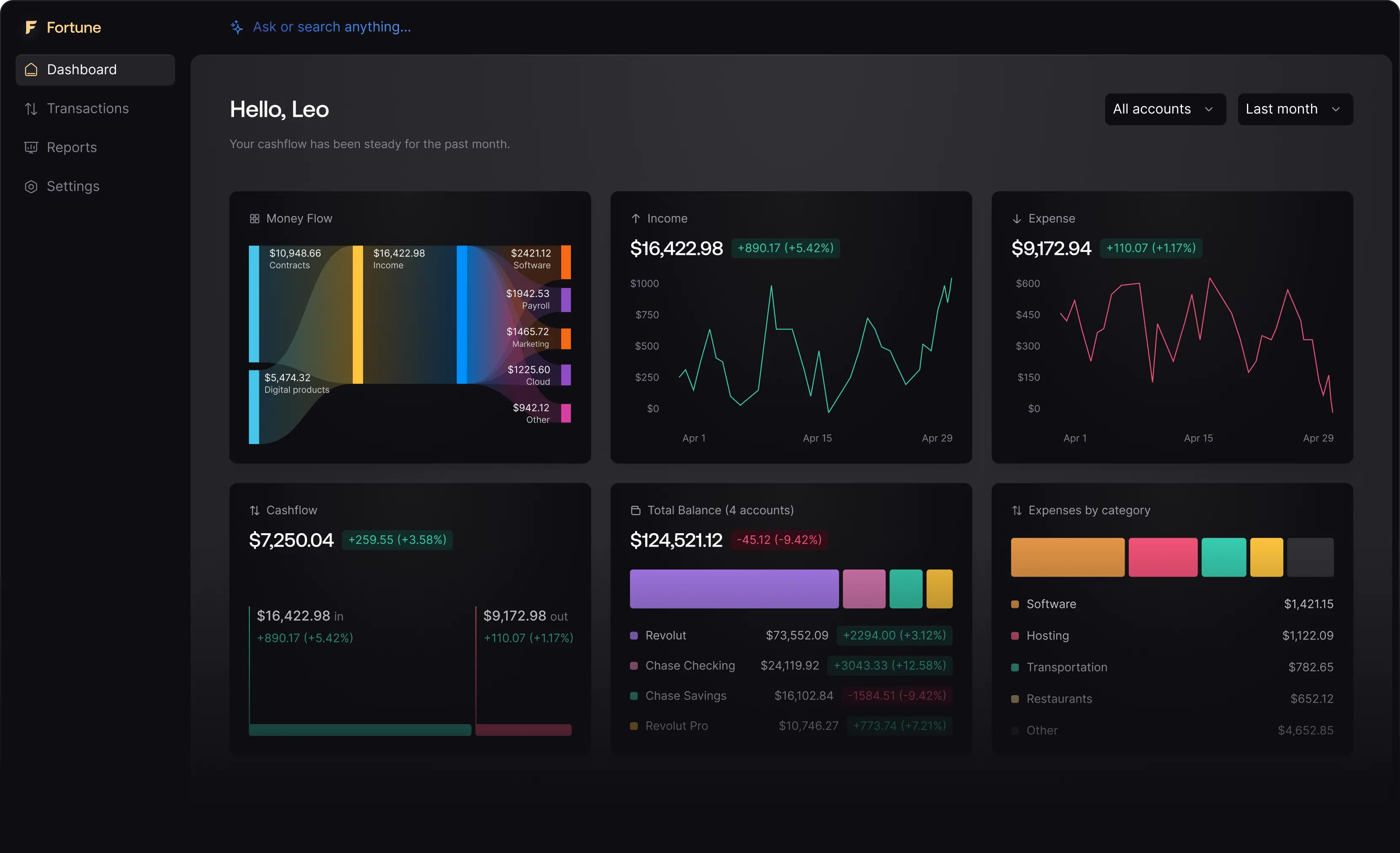
Easily manage financial management with Small Business Accounting Software from Fortune App. The software automates the daily grind for small businesses, bank-feed sync, transaction categorisation, duplicate detection across linked accounts, and real-time cash-flow visibility, saving time and reducing errors.

Best Accounting Software Reviews
Explore what users are saying about Fortune App through video reviews, Google reviews, and Reddit discussions.

Start accounting the right way.

International Accounting Software Fortune App
Fortune App's International Accounting Software simplifies managing global finances with ease. Businesses using Fortune App navigate international accounting seamlessly.
Managerial Accounting Software
Managerial Accounting Software supports internal reporting and decision-making for businesses by tracking costs, evaluating performance, and improving financial planning. The software helps manage expenses and resources efficiently through accurate data insights.
Key Features
- Budget planning and variance analysis
- Cost center tracking and allocation
- Performance dashboard and KPIs
- Product profitability analysis
- Break-even and margin analysis
- Automated profit and loss reporting
Forecasting Capabilities
- Rolling budget forecasts with scenario planning
- Sales and revenue projections by product or service
- Production cost forecasting based on operational data
- Seasonal trend analysis and planning
Payroll Integration
- Labor cost allocation by department or project
- Employee productivity and cost analysis
- Overhead allocation, including payroll taxes
- Integrated tax calculations and filings
Cashflow Benefits
- Real-time cash position monitoring
- Working capital optimization insights
- Investment Return on Investment (ROI) analysis and tracking
- Optimized resource allocation
Why choose Fortune App for Small Business?
Advanced Forecasting
Leverage powerful forecasting tools with scenario planning, cost projections, and profitability analysis to make data-driven decisions.
Integrated Cost Tracking
Simplify cost center management, expense allocation, and product profitability analysis for improved financial control.
Cash Flow Optimization
Monitor real-time cash positions, automate budget allocation, and optimize working capital for better resource management. Fortune App’s tools help businesses track costs effectively, ensuring smarter decision-making and improved financial performance.
Small Business Accounting Software for Different Industries
Automate financial management with Small Business Accounting Software for Different Industries, powered by Fortune App. Fortune App's Accounting Software automates bookkeeping, organizes financial data, and delivers accurate reports tailored to different industries (retail, healthcare, construction, real estate).
Real EstateAccounting App
Real Estate Accounting App simplifies every aspect of real estate financial management with ease and accuracy. The tool helps manage property expenses, rental income, and tax obligations while providing clear financial visibility across multiple properties.
Key Features
Industry Benefits
International Accounting Software Features
International accounting software manages financial operations across multiple countries while ensuring compliance with global accounting standards. International accounting software enables businesses to track finances, handle multiple currencies, and comply with international tax regulations.
Cloud Base Software Accounting
Cloud-based accounting software offers businesses a flexible and secure solution for managing financial data without the need for local installations or IT infrastructure. Cloud-based accounting software stores data on remote servers, allowing users to access financial information anytime and from anywhere with an internet connection.
Advantages of Accounting Software
Advantages of accounting software include streamlined financial management, automation of tasks, and improved accuracy. The software simplifies transaction tracking, reporting, and compliance, while offering scalability to support business growth and decision-making.
Accounting Software Advantages for Freelancers
Streamline business operations with powerful and straightforward accounting tools specifically for independent contractors and freelance professionals.
Key Advantages
Business Impact
Problems Solved
Subscriptions for Fortune App (Small Business Accounting)
Steps to Use Accounting Software
Frequently Asked Questions
The software tracks cash inflows from sales and receivables is very effective, as it integrates well with bank accounts to provide real-time insights into financial transactions. The software ensures that sales and receivables are accurately recorded and monitored by automatically capturing all incoming payments. The process reduces manual data entry, minimizing the risk of errors and ensuring up-to-date financial data. The software continuously updates cash flow through automation, offering businesses a comprehensive view of income and expenses. The software's integration with accounting tools further improves reporting accuracy, allowing businesses to analyze trends and manage cash flow efficiently.
Yes, the software can project future cash outflows for expenses and payables. The software uses historical financial data and predictive algorithms to forecast future expenses, enabling businesses to manage cash flow more effectively. The software generates projections based on trends and scheduled payments by integrating with accounting tools and tracking ongoing payables. The system allows businesses to anticipate cash needs and plan for upcoming expenses. The system ensures that projected outflows are updated regularly, providing an accurate view of future financial commitments and helping businesses avoid cash shortages.
Yes, the system provides tools for cash flow forecasting based on historical data. The system generates projections for future cash flows by analyzing past financial transactions and trends, helping businesses anticipate incoming and outgoing funds. The tools utilize predictive algorithms to consider historical revenue, expenses, and seasonal variations, allowing for accurate cash flow planning. The functionality helps businesses prepare for future financial needs and make informed decisions regarding expenditures, investments, and financial strategies. Regular updates ensure the projections remain accurate as new data is incorporated.
The software helps in managing short-term cash needs or surpluses by providing automated tracking of daily transactions, real-time account balances, and categorized spending insights. Each feature helps users understand funds and obligations through a unified dashboard showing incoming payments, pending invoices, and expenses. It allows identifying surplus periods or shortfalls, reallocating excess funds, or adjusting payment priorities if expenses exceed cash. The system connects to bank feeds and payment platforms, reflecting current transactions and reducing errors. Visual summaries of cash flow trends assist in recognizing seasonal patterns, supporting proactive planning, and preventing overdrafts or missed payments. The software’s design emphasizes clarity, speed, and relevance, making short-term cash decisions more accurate and less reactive.
The Reconciliation Features for the Cash Account Ledger are listed below.
- Automated Transaction Matching: The system compares bank feed entries with ledger records without manual input, reducing errors and saving time during daily reconciliation.
- Real-Time Sync with Bank Accounts: Direct integration with financial institutions ensures that every transaction appears instantly in the ledger, supporting accurate cash tracking.
- Rule-Based Categorization: Custom rules assign transactions to appropriate accounts based on vendor, amount, or description, streamlining the reconciliation process.
- Discrepancy Alerts: The platform flags unmatched or duplicate entries, allowing users to resolve inconsistencies before they affect financial reports.
- Visual Reconciliation Dashboard: A centralized view displays matched, pending, and flagged transactions, helping users monitor reconciliation status at a glance.
- Audit-Ready Reporting: Each reconciliation cycle generates a timestamped report with traceable entries, supporting compliance and internal reviews.
- No Manual Entry Required: The system eliminates the need for manual data input by pulling verified records directly from connected accounts.
Yes, the chart of accounts ships with Cost of Revenue (Cost of Goods Sold and Cost of Services) and Operating Expenses subcategories that include Depreciation and Amortization, Payroll, Interest Expense, Income Taxes, and the rest of the standard P&L line items. Depreciation, amortization, and COGS calculations belong to your accountant's monthly close, Fortune App provides the categorised transaction history they need to do that work and feeds it into the Income Statement, Balance Sheet, and Cash Flow Statement reports.
The Accounting Guide
Honestly, most folks get through their first invoice and bank reconciliation within an afternoon. Fortune App leans on muscle memory from tools you've probably already touched, so if you've used QuickBooks or Xero you'll feel at home inside a day.
The in-app guidance sits out of the way, it appears when you need it and disappears when you don't. Nobody wants to learn software while also doing their taxes.
A real human replies, usually within an hour on business days. We try hard not to bounce you between tiers, the person you first talk to can log bugs with engineering directly.
If your issue is common enough, the answer is usually one short reply, and if it isn't, the same person stays on the thread until it's fixed rather than handing you off to start over with a new agent.
Your data sits in our cloud infrastructure with US and EU regions available, encrypted at rest and in transit by the platform defaults you'd expect. Inside the company, only a small on-call group can touch production, and every access is logged.
The only other humans who see your books are the team members and accountants you explicitly invite. We don't sell data, it's not even remotely part of the business model.
Not painless, let's be honest, any books migration has rough edges, especially if your chart of accounts is a bit of a museum. That said, we import historical transactions, opening balances, customers, and vendors out of the box.
If your data is unusual the team will sit on a call and work through it with you. Most small businesses are fully moved within a week.
The monthly price is the monthly price. Payment processing is passed through at cost, and we don't charge extra for 'advanced' reports or the first few teammate seats.
If you need payroll or a higher tier, it's clearly listed on the pricing page. No stealth increases at renewal, no surprise line items.
Most accounting tools assume you run like a textbook SMB, and we know that's rarely true. You can rename categories, build custom transaction rules, and wire approvals around how your team actually operates.
When something's genuinely missing, our team has a pretty good track record of shipping small, targeted tweaks within a sprint rather than telling you 'it's on the roadmap'.
Bank feeds are the meat of the product, 12,000+ institutions via Plaid, and for everything else there's a clean CSV import (with AI-assisted column mapping when your statement is a PDF) and a public API. Categorisation, duplicate detection across linked accounts, and your own custom transaction rules all run automatically once the data lands.
Payroll integrations are on the near-term roadmap. If a tool you depend on isn't supported yet, we'll tell you up front rather than dance around it.
You can categorise, reconcile, and review your balances from your phone, the core daily flows are all there. Some of the heavier reporting is still nicer on desktop simply because big tables want big screens.
If you live behind a counter or in a truck, you can genuinely run your books from mobile without feeling like you're making do.
We've run at roughly 99% uptime over the last year. There's a public status page that updates within a minute or two of any incident, and we email customers proactively for anything longer than a blip.
Post-mortems for major incidents get published the week after. No quietly hoping nobody noticed.
Multi-currency support covers USD, EUR, GBP, and CAD today, transactions in any of those reconcile cleanly into your reporting currency. FX rates refresh daily through our forex service so the numbers stay consistent at month-end and historical conversions don't drift on you.
If you operate primarily in a currency outside that set, tell us upfront and we'll be honest about whether it'll fit your workflow today or whether you're better off waiting for the next rollout.
One-click export to CSV and Excel, both formats import cleanly into QuickBooks, Xero, or whatever you migrate to. Your books are yours, we're just renting them a nice home.
There's no export fee. Pull a clean snapshot any time before you cancel and you keep everything you need.
We lean hard on prevention rather than recovery. The duplicate detector watches for transfers between your own linked accounts and flags them automatically, so the most common cause of double-entry headaches doesn't show up in your books in the first place. Bank feeds run on Plaid with retries on transient failures, so the underlying transaction data stays clean.
Honest caveat: deletes are deliberate and final, so we surface a clear confirm dialog rather than pretending we can quietly walk it back. And if you have identical recurring vendor charges on the same day, you'll still want to eyeball them, no software gets that right every time.